What is AI Agent Experience (AX): A Guide for Developers & UX Designers
A practical intro to AI Agent Experience (AX) for UX designers, developers and teams. Learn how to use AX design for tools, skills and improving agent work.

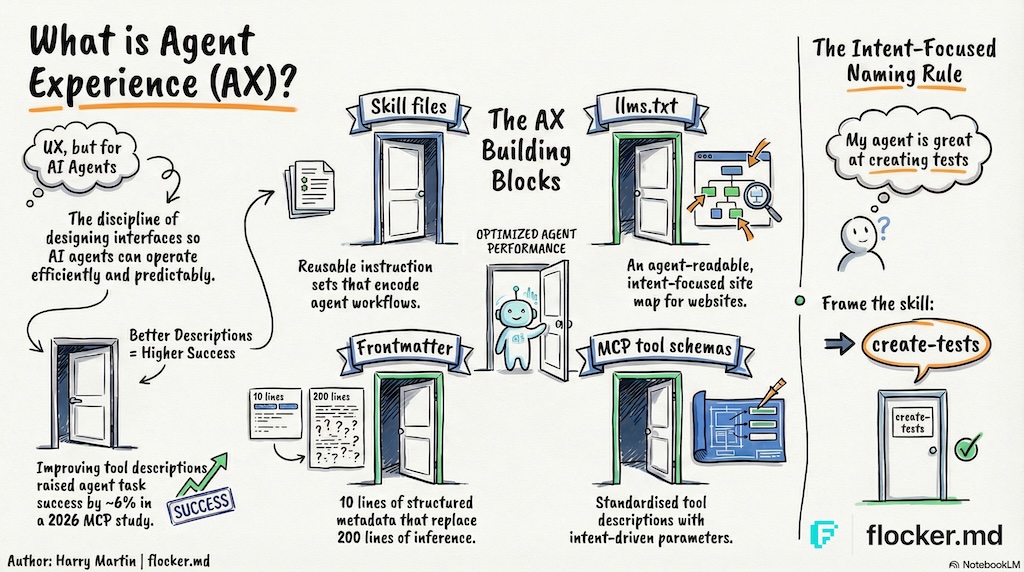
What is AI Agent Experience?
AI Agent Experience is the holistic experience an AI agent has as a first-class user of products, tools and platforms.
AI agents are proving their value as personal assistants, and in the workplace. Agents are being given access to calendars, journals, social media, trading platforms, and even the ability to communicate with each other.
Agents have become both an accelerating tool and a first-class user.
This raises the question for builders and teams using agents: how can I improve agent interaction with my product and tools?
This is a new discipline, and so in this article I have provided an intro to AI Agent Experience Design for UX, and indirectly, DX (Developer Experience, more on this later).
Why AX matters
“You are the average of the five people you spend the most time with.” — Jim Rohn
Is an AI agent in your top five? Are you or your colleagues in an agent’s top five?! If so, this article (and AX) is for you.


Skip to the TL;DR
What is AX design? (and why UX designers care)
UX design (User Experience) is the discipline of designing how people interact with products — shaping interfaces, flows and information to be intuitive, efficient and satisfying.
Agent Experience (AX) extends User Experience design to AI agents, a term introduced by Netlify CEO Mathias Biilmann in 2025. AX design is the discipline of shaping agentic AI interfaces so agents can operate efficiently and predictably.
In practice, this means considering the holistic experience an agent has as a new first-class user of your products, tools and platforms.
What are AI agent tools?
AI agent tools extend the agent’s ability by providing operational instructions to perform specific tasks or an interface to allow agents to interact with external systems.
How well-designed tools improve agent performance
A 2026 study of 856 tools across 103 MCP servers found that improving tool descriptions raised agent task success by a median of 5.85 percentage points and partial goal completion by 15.12%.1
We will use the most common agent tool as an example: the web search tool.
Websites are designed for people. Webpages are typically upward of 500 lines of html code and a typical website in 2016 had 26 HTML element types.
If an agent opens a standard webpage - every line of code, relevant or not, goes into its limited context memory - so now your “crypto trading agent” knows more about the ads in the website than the trade you want it to make.
Now imagine instead: the website supports agents by providing a text version of the page content - so by adding “.md” to the end of the url, the agent gets a 50-line text file with only the important text content.
It might not look pretty to us, but for AI agents the content is clean and uses fewer tokens. No context is wasted and the agent stays focused on the task at hand.
AI platforms such as OpenAI and Anthropic charge you for the text your agent writes and reads.
This is one example of an optimized Agent Experience tool for accessing web content.
Common types of agent tools
Not all tools are created equally.
- SKILL.md files are minimal instructional “tools” that can be accessed when needed, supported by most platforms.
- MCP is a common standard for complex agent interfaces.
- Plugins are usually provider specific (eg. Claude Code or OpenClaw).
What are MCP tools?
You might be familiar with web AI tools like Figma Make that allow you to talk to a Figma AI for building out designs directly.
MCP Agent tools take this a step further by giving your own agents direct access - so your agent can get on-demand access to Figma design tools, your in-house design documents and company Slack channel only when it needs to in order to complete a task.
Popular examples of AI agent tools
Here are a few popular tools, and use cases:
- Figma (MCP): Connect agents directly to Figma canvases - view, design and code
- Obsidian (MCP): Connect your agents to your existing Obsidian journal data - or as their own ultimate journal
- Microsoft Teams (OpenClaw Plugin): Connect OpenClaw agents to Microsoft teams chat
- llms.txt: a new standard for websites to add an agent-readable /llms.txt website directory. Note that this is a proposed standard. Ahrefs covers it in depth here and adoption is growing.
- Moltbook: A social media platform for OpenClaw agents that uses SKILL.md files
How to design agent tools that work
AI agents, like people, rely on context to make sense of information.
An agent’s “memory” consists of tokens or more simply ‘words’. That window of context is explicitly limited.
Reducing the amount of context required to reliably perform a task means faster, and cheaper, results.
Sadly, no amount of coffee (☕️ to ChatGPT) will protect your agent from context collapse that your colleagues will get a laugh out of.
The importance of semantics (aka words & intent)
There are two requirements for a good tool name:
- An agent, given an instruction, should reliably identify the relationship between the task and the tool name
- A user, providing instruction, should naturally describe the tool while giving instructions
The instructions (and context) should make the relationship obvious between the work to be done and the right tool to use.
A poorly named tool might be loaded unintentionally if it’s too ambiguous.

This ties directly to how LLMs are trained: by associating tokens with meaning.
You wouldn’t be surprised if an agent got lost when their map didn’t match the signs
How to name AI agent skills
An agent should be able to identify skills relevant to a task from the name and description.
The current recommended practice is to include the action or goal into skill and tool names.
Most AI platforms will inject a list of skills into the agent’s context at the start. This list is built from the frontmatter contained in your skills.
You (and your team) ideally want to be able to directly reference skills when giving instructions, increasing its likelihood of being used. Keep it short and focused.
Simple method for naming AI Agent skills
Here’s a quick and simple method for naming most AI agent skills successfully:
In one short sentence, describe what your agent is skilled at doing after reading the skill.
“My agent is skilled at doing this.”
The goal-oriented skill name should become obvious from this simple process.
“My agent is skilled at making branded Figma slides”
skill name: make-branded-figma-slide ✓
“My agent is skilled at writing code documentation”
skill name: write-code-docs ✓
Avoid ambiguity - a skill named ‘code-docs’ could load whenever code-documentation is mentioned.
Results vary, but {verb}-{goal} is the quickest way to avoid common skill naming traps.
How to connect skills and references
Embedding references to other skills provides a way for your agent to optionally load other skills, and can also be used to break work up into discrete steps.
You can also embed references to other context sources, such as documents.
Remember that
SKILL.mdis a markdown file and you should use the markdown link format for references.
If the reference is another skill, you can usually use the skill name just as you would type it in a chat window, usually in the form of /common-task-skill.
If the reference is other context, such as guides or documents, you can use a full or relative path.
If in doubt, use the relative path. The agent will search for the file if required.
Example of how to combine skills
Here’s an example extracted from a skill called publish-new-site that contains a skill and document reference:
# Task Steps

Follow these steps in order to complete the task.
Access any references provided at the start of each step.

- Step 1: Perform a structured review of the site
    use the [pre-publish review skill](/pre-publish-review)
- Step 2: Prepare a release
    use the [site publishing guidelines skill](/references/docs/site-publishing-guidelines.md)
By providing explicit instruction to access references at the start of each step, the agent should (context allowing) access them in order.
Important note
Agent platform providers can have different ways of storing skills.
- OpenAI Codex uses
.agents/skills - Claude Code uses
.claude/skills(slow clap for Anthropic 👏)
🕊️ Flocker handles these differences for you
Remotion is a fantastic example of clever nested skill design that can achieve production-ready results with little user guidance.
TL;DR: Getting started with agent experience
Agent Experience (AX) extends User Experience (UX) design principles to AI.
Skill files. Instruction sets that usually encode workflows. Instead of re-prompting an agent from scratch each time, a skill file can provide a reliable guide and be updated over time.
Use the simple goal-oriented method to quickly name skills and tools.
LLMS.txt files. A website’s agent-readable, intent-focused site map.
Frontmatter. YAML frontmatter at the top of a markdown file is one of the simplest AX investments you can make. Title, description, tags - structured metadata that tells an agent in 10 lines what it might otherwise take 200 lines to infer from the document itself.
MCP tool schemas. As the Model Context Protocol ecosystem grows, the quality of AX in tool design is becoming a meaningful differentiator. A good tool description describes the parameters in an intent-driven format.
Agents are already fast. The biggest performance gap between an average agent and an efficient one is the quality of the context the model receives.
Agent experience design at work (UX × AX)
How long will it be before we start seeing AX Designer roles on LinkedIn?
AI Engineer roles started appearing in 2023 - only months after ChatGPT launched (November 2022). AX could be the natural next step for UX Designers looking to break into the AI industry.
If you’re coming from UX, some of what you already do might be more relevant than you think:
- User research — observing where agents get stuck, instead of people
- Information architecture — structuring tool descriptions and skill directories
- Writing microcopy — writing for AI agents (LLMs)
- Prototyping flows — designing multi-step workflows an agent can follow
If you have built an agent tool you would like us to share, or are using agent tools for work, we would love to hear about it! Email us at editor@flocker.md
We’ll be publishing a deeper guide on AX design patterns and career paths soon. Follow us or join early access to get notified.
Paper references
Footnotes
-
Mohammed Mehedi Hasan, Hao Li, Gopi Krishnan Rajbahadur, Bram Adams, and Ahmed E. Hassan, “Model Context Protocol (MCP) Tool Descriptions Are Smelly! Towards Improving AI Agent Efficiency with Augmented MCP Tool Descriptions”, Hugging Face Papers, February 21, 2026. Secondary source: arXiv. ↩