Agent Worktree Trace: Track Many Agents While They Work
A free, open-source VS Code extension for developers running multiple AI agents in parallel. See which files your agents have changed.
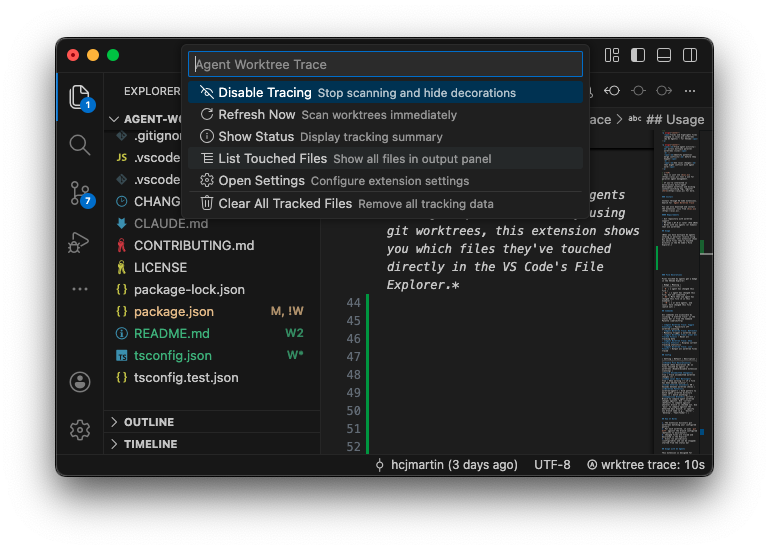
Running multiple AI agents in parallel with worktrees is fantastic, and the pace can be exciting.
But it can also cause headaches.
Tracking which files have been modified across different worktrees as you work hasn’t really been addressed by our favourite IDE’s yet.
So we built Agent Worktree Trace to fill the gap.
Git Worktrees
Git worktrees are a practical way to run multiple AI agents simultaneously. Each agent gets its own isolated working directory; a branch of the codebase, in another folder, with full git support.
But this setup introduces tracking challenges:
- It’s easy to lose track of which files have been modified in each worktree
- Merge conflicts happen when you and an agent (or many agents) modify the same file
- VS Code provides no built-in way to see cross-worktree file status at a glance
These issues slow down the development loop and increase the risk of conflicting changes going unnoticed until merge time.
How it looks
Agent Worktree Trace is a VS Code extension that monitors your local git worktrees and surfaces file modification status directly in the standard File Tree view.
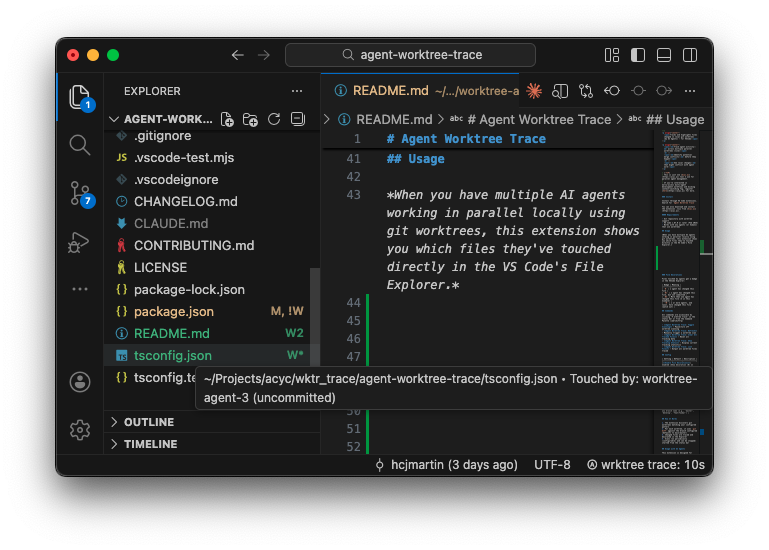
The extension adds file badges that indicate worktree activity:
- W - File changed in one worktree (committed, unmerged)
- W* - File has uncommitted changes in one worktree
- W3 - File modified in multiple worktrees (number indicates count)
- !W - Conflict risk: file modified in your workspace AND a worktree
The extension requires zero configuration. It works with default worktree naming patterns and provides real-time monitoring.
Why We Built It
Knowing which files are in play across your worktrees helps you avoid conflicts and make better decisions about what to delegate.
Agent Worktree Trace is free and open-source under the MIT license. It’s a first step toward better tooling for multi-agent development workflows.
Get Started
Install Agent Worktree Trace from the VS Code Marketplace.
View the source, report issues, or contribute on GitHub.